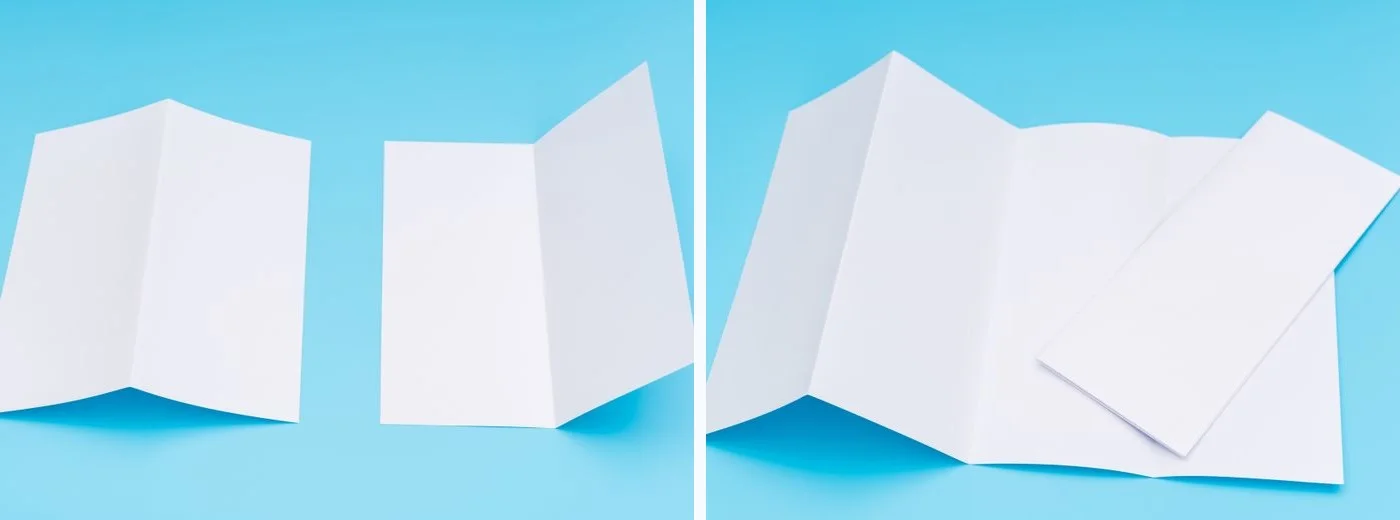
Brochure fold types determine what readers see first, how they move through the information and how the finished piece fits a rack, envelope or handout bag. This guide compares the main folds, shows what happens to common sheet sizes and walks through the artwork for a letter-size service brochure.
Featured photo designed by Magnific
What are the main brochure fold types?
The flat size is the trimmed sheet. The finished size is the closed piece. Panels are the sections separated by folds. Three panels printed on both sides give you six printable faces.
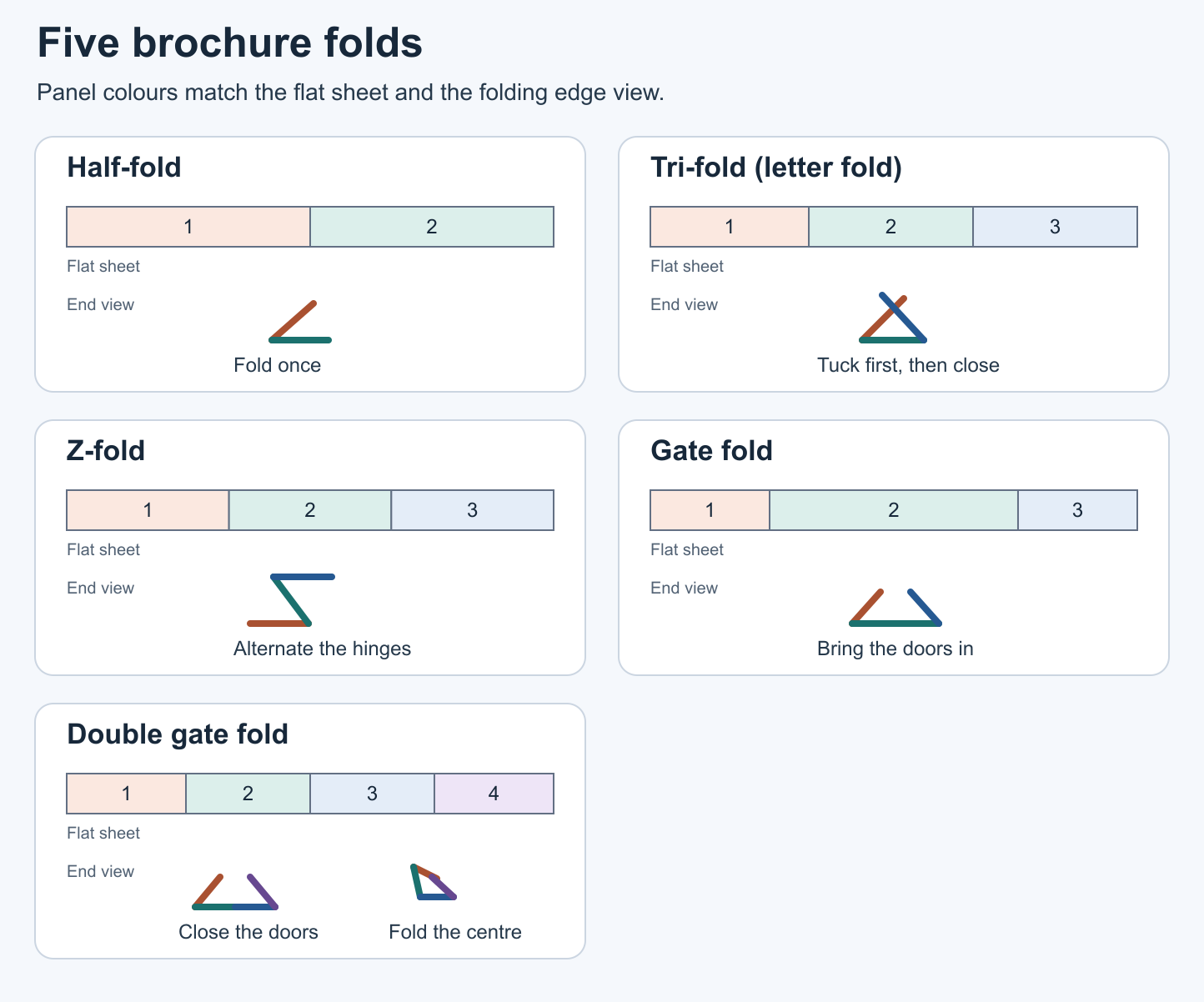
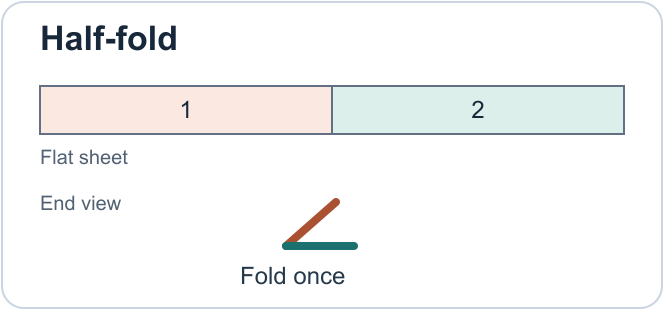
- Half-fold (bi-fold). Fold the sheet once, like a card. Two equal panels open to make one wide spread. Use it for a short menu or a property feature sheet.
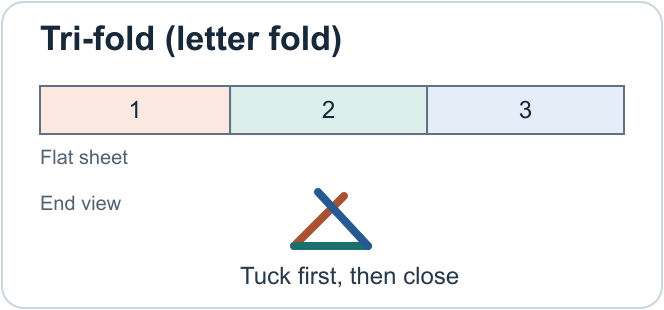
- Tri-fold (letter fold). One outside panel tucks inside and the other wraps over it as the front cover. The tucked panel is usually narrower. The first opening reveals the flap, and the next reveals the full inside spread.
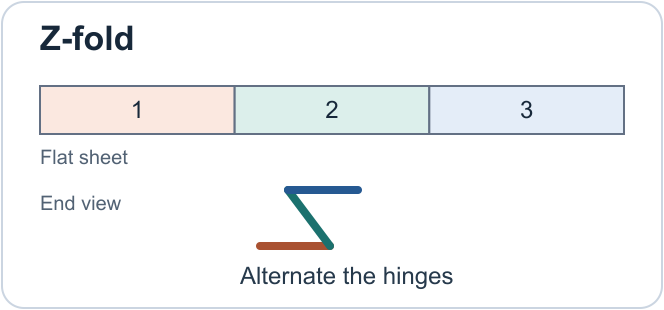
- Z-fold (three-panel accordion). The two folds turn in opposite directions. There is no enclosed tuck panel and the three panels are typically equal. Longer accordion folds can have additional panels.
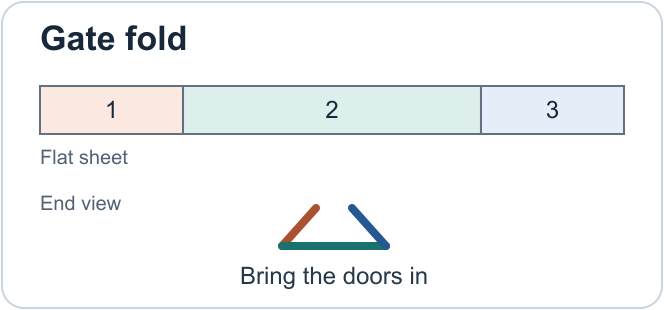
- Gate fold. Two side panels swing inward and meet near the middle of a wide centre panel. Each door is roughly half the centre width, with clearance set by the printer. The doors open outward to reveal the centre.
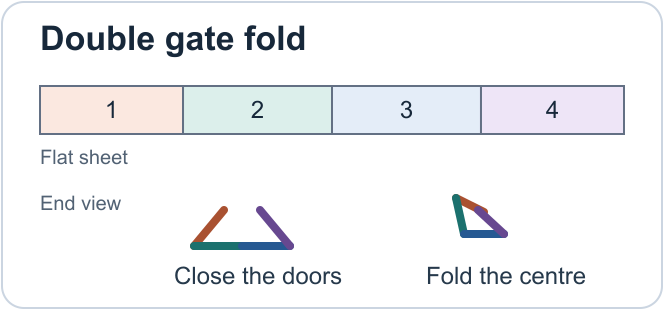
- Double gate fold. The two outer doors fold inward first. The piece then folds again along the centre hinge. The inner panels must accommodate the tucked doors and the thickness of the stock.
- Roll fold. Panels turn inward successively in the same direction. A four-panel roll fold needs room for the nested layers, so the inner panels may need progressively more clearance.
Browse the brochure product category for standard options.
Tri-fold vs. Z-fold brochures
Choose a letter fold for a cover, a reveal and a full inside spread. Choose a Z-fold when the content works as a sequence of equal panels, such as steps in an installation guide. For a tri-fold vs. Z-fold brochure comparison, fold both mock-ups and check where readers start.
| What to compare | Tri-fold or letter fold | Z-fold or accordion fold |
|---|---|---|
| Fold and opening direction | Both wings fold inward around the centre. Open the cover, then the tuck panel. | One hinge folds forward and the other folds back. The sheet opens like an accordion. |
| Panel widths | Two full-width panels and a slightly narrower tuck panel. | Three equal panels on a typical layout. |
| Reading order | Cover introduces the subject, the flap gives a preview, and the full interior carries the details. | Repeated panel widths suit a sequence. Mark where readers should start on each face. |
| Design | The interior works as one spread or three sections. Keep critical details clear of hinges. | A timeline, map or step-by-step sequence can extend across the open sheet. |
| Production and cost | Check tuck clearance, grain and scoring. Often a standard fold. | Check opposite fold directions, grain and scoring. Price depends on the printer’s setup and stock. |
Flat sizes, finished sizes and panel widths
These landscape examples fold across the long dimension. Flat sizes are nominal trim dimensions. Finished sizes are rounded planning figures. Actual tolerances depend on stock and equipment.
| Fold type | Flat sheet | Finished size, approx. | Panels per side | Panel width and production considerations | Typical use |
|---|---|---|---|---|---|
| Half-fold | 11 × 8.5 in (279.4 × 215.9 mm) | 5.5 × 8.5 in (139.7 × 215.9 mm) | 2 | Equal widths. One crease or fold. | Menu, property overview |
| Letter fold | 11 × 8.5 in (279.4 × 215.9 mm) | 3.69 × 8.5 in (93.66 × 215.9 mm) | 3 | Shorter tuck. Confirm its side and clearance. | Service brochure |
| Z-fold | 14 × 8.5 in (355.6 × 215.9 mm) | 4.67 × 8.5 in (118.53 × 215.9 mm) | 3 | Three equal nominal widths. Hinges turn opposite ways. | Instructions, itinerary |
| Gate fold | 17 × 11 in (431.8 × 279.4 mm) | 8.5 × 11 in (215.9 × 279.4 mm) | 3 | Centre about twice each door. Allow room where they meet. | Product reveal |
| Double gate fold | 17 × 11 in (431.8 × 279.4 mm) | 4.25 × 11 in (107.95 × 279.4 mm) | 4 | Quarter-width starting estimate. Confirm each door and centre hinge. | Event or sales piece |
| Roll fold | 14 × 8.5 in (355.6 × 215.9 mm) | About 3.5 × 8.5 in (88.9 × 215.9 mm) | 4 | Quarter-width starting estimate. Nested panels require clearance. | Staged instructions |
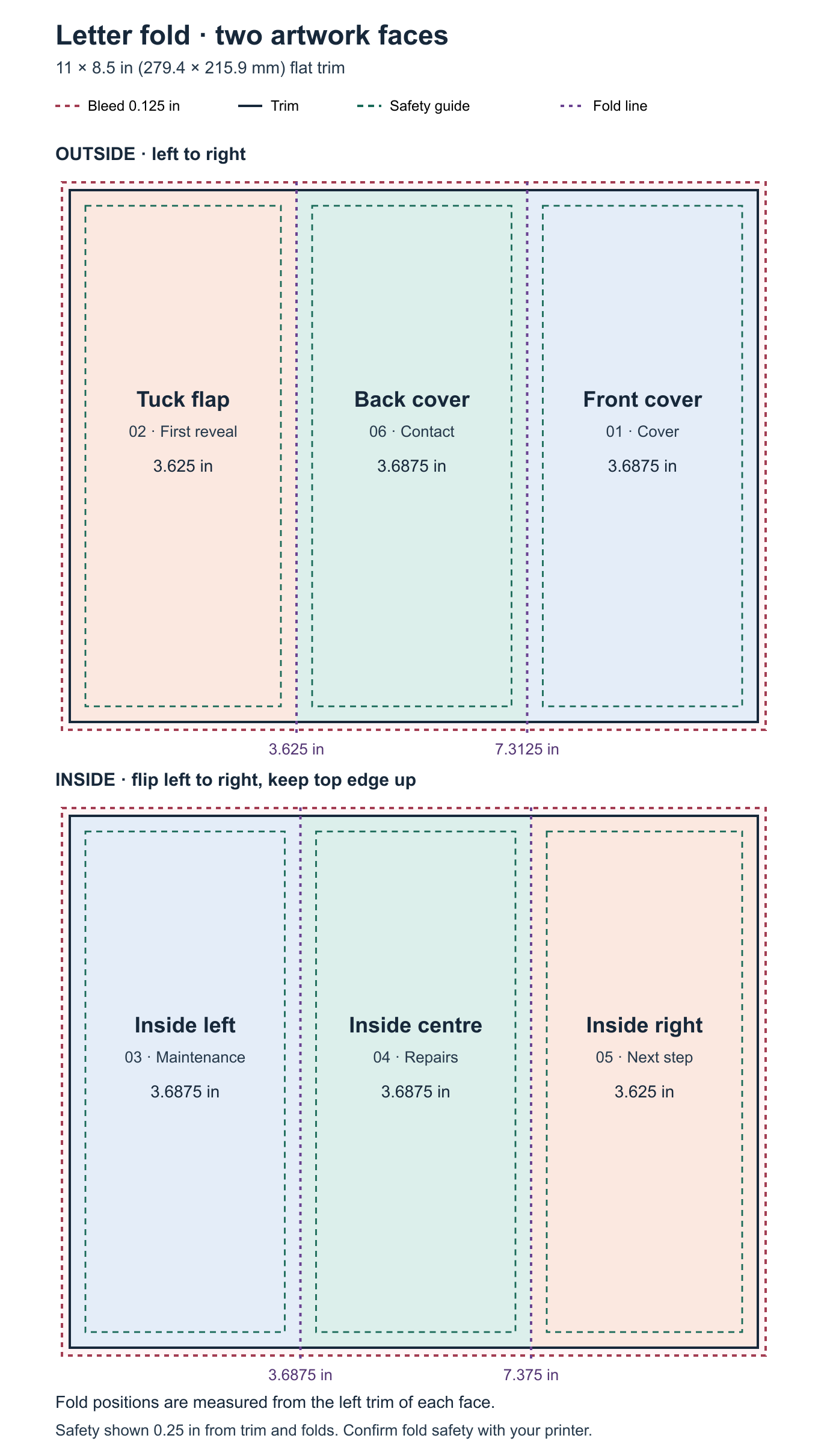
For a standard 11-inch letter fold, a published folding template gives two 3.6875-inch panels (93.6625 mm each) and a 3.625-inch tuck panel (92.075 mm). Use the template for your order. Heavier stock and nested folds can change the allowance.
Paper, applications and quote details
Choose a stock that opens easily at the intended folds. Branding Centres lists 100 lb gloss or matte text as standard brochure stock, with silk-coated options and heavier 100 lb cover available. Gloss gives photographs a shinier surface. Matte or silk reduces glare. Ask about uncoated paper if readers need to write on the piece.
Text stock is generally more flexible than cover stock. Text and cover use different basis sizes. Ask for the caliper if the folded piece must fit a holder. On heavier brochure stock, ask whether the fold can run with the grain. Sappi’s paper-folding guide explains why scoring helps with heavy stock, multiple folds and dark print coverage. Ask to see a folded sample when a clean crease matters.
- Restaurant menus. Half-fold for a compact menu or Z-fold to separate categories.
- Retail product brochures. Letter fold for a curated range or gate fold for a single featured product.
- Real estate brochures. Half-fold for a large photograph and floor plan.
- Service companies. Letter fold for service categories, an overview and contact details.
- Trade show handouts. Letter fold for a compact takeaway or Z-fold for a short product comparison.
- Event programmes. Z-fold for a short schedule. A booklet may suit a longer event programme with several tracks.
- Product instructions. Z-fold for a visible sequence or roll fold when readers should open one stage at a time.
Quote the flat and closed sizes, stock, fold, quantity and due date. Specify one or two printed sides, full colour or other ink requirements, scoring and any extra finish. Compare two quantities. Setup can increase the unit price on small runs. Specialty folding, added finishing and rush scheduling can change the total.
Artwork setup and a worked letter-fold example
Build two flat pages using the printer’s fold positions. Use the Branding Centres design guide for file preparation and start with the product templates or request the template for your chosen fold.
Example for a Toronto service business
A Toronto HVAC company orders 250 leave-behinds on 100 lb matte text, printed full colour on both sides of an 11 × 8.5 in sheet. The cover identifies the service. Inside panels explain maintenance, repairs and next steps. The back carries the contact details.
Using the example template, the outside runs tuck flap, back cover, front cover from left to right. The inside reverses the physical panel order when you flip the sheet left to right and keep the top edge upright. The fold positions are 3.625 and 7.3125 in from the left trim on the outside (92.075 and 185.7375 mm). On the inside they are 3.6875 and 7.375 in (93.6625 and 187.325 mm). Confirm those positions with the printer before exporting artwork.
Preflight before ordering
- Set two landscape pages to the flat trim size. Extend edge-to-edge backgrounds 0.125 in (3.175 mm, about 3 mm) beyond trim on every outside edge.
- Keep live text at least 0.25 in (6.35 mm) inside the trim per the shop’s guide. Keep text, QR codes and other critical elements clear of folds using the printer’s recommended safety margin.
- Use CMYK as specified and check that photos are about 300 DPI at final size. Keep logos and type as vectors where possible.
- Keep fold lines on a non-printing guide layer. Export a two-page print PDF at full size with embedded fonts and the requested bleed. Include marks only if requested.
- Print a full-size duplex mock-up, check the top edge on both faces and fold it by hand. Approve the PDF proof, then confirm the stock, score, closed size, quantity and delivery or pickup date.
Frequently asked questions
Is a tri-fold brochure the same as a Z-fold brochure?
A letter-fold brochure tucks one panel inside. A Z-fold opens in alternating directions and usually has equal panels. Both have three panels per side on standard layouts. Specify the fold name and supply a marked mock-up if the opening direction matters.
What size is a folded letter-size brochure?
An 11 × 8.5 in letter-fold sheet typically closes to about 3.69 × 8.5 in (93.66 × 215.9 mm). An equal-panel Z-fold closes to about 3.67 × 8.5 in (93.13 × 215.9 mm). Use those figures as a starting point for a tri-fold vs. Z-fold brochure decision. Check the closed size and clearance for your holder or envelope before ordering.
Should all three tri-fold panels be the same width?
A standard letter fold typically needs a narrower tuck panel so the inside edge clears the outer hinge. Equal panels are typical on a Z-fold. Use the exact widths and fold positions on your printer’s template for both artwork faces.
Can I fold heavier brochure stock?
Many cover stocks can be folded with the right grain orientation and scoring. Ask the printer to test the chosen stock, especially for a nested fold or artwork with dark colour crossing a crease. A folded proof lets you check spring-back and cracking.
Which fold usually costs less?
A half-fold or standard letter fold is often simpler to finish than a double gate or roll fold. Compare quotes with identical stock, quantity, colour and turnaround to see the actual difference. A shop’s available folding equipment can affect the price.
Can I order a short run or request rush printing?
Branding Centres offers short runs with no minimum order quantity. Same-day is available on qualifying orders, usually letter-size half-folds or letter folds with print-ready PDFs confirmed before noon. Ask about next-day timing, the stock and current capacity when you send the file.
Ready to Print Your Brochures?
The right brochure fold types are the ones that fit your content, your finished size and the way you’ll hand out the piece. Branding Centres prints brochures for Toronto and GTA businesses, with pickup in Etobicoke and Uber delivery available. Same-day or next-day production depends on the order and current capacity.
See brochure printing options or request a quote. Include your fold, flat size, stock, quantity and deadline. For rush availability, call +1 (416) 288-8661. Pickup is at 24 Ronson Drive, Unit 1, Etobicoke, ON M9W 1B4.