A half-sheet flyer gives you room for one clear offer. A letter-size sheet can carry a fuller menu or service list. This guide compares flyer sizes by finished measurements, usable space and purpose, so Toronto and GTA businesses can choose a format before building artwork.
Common flyer sizes compared in inches and millimetres
Common finished dimensions range from 4 × 6 in to 11 × 17 in; the right choice depends on your content and distribution.
Compare finished dimensions, also called trim size. Bleed sits outside that boundary and is cut away; it adds no room for essential content.
| Format | Finished size in inches [millimetres] | Area compared with letter | Useful starting point | Advantages and considerations |
|---|---|---|---|---|
| Compact | 4 × 6 in [101.6 × 152.4 mm] | 25.7% | One offer, invitation or bag insert | Easy to carry; little room for terms or multiple offers |
| Mid-size | 5 × 7 in [127 × 177.8 mm] | 37.4% | Photograph-led promotion | More image space; detailed menus can still crowd the layout |
| Half sheet | 5.5 × 8.5 in [139.7 × 215.9 mm] | 50% | Handouts, compact menus and event details | Room for image and details; long menus may need two sides |
| Letter | 8.5 × 11 in [215.9 × 279.4 mm] | 100% | Service lists and property information | Clear sections; less convenient as a compact handout |
| Tabloid | 11 × 17 in [279.4 × 431.8 mm] | 200% | Detailed schedules or larger displays | Twice letter's area; awkward to carry flat |
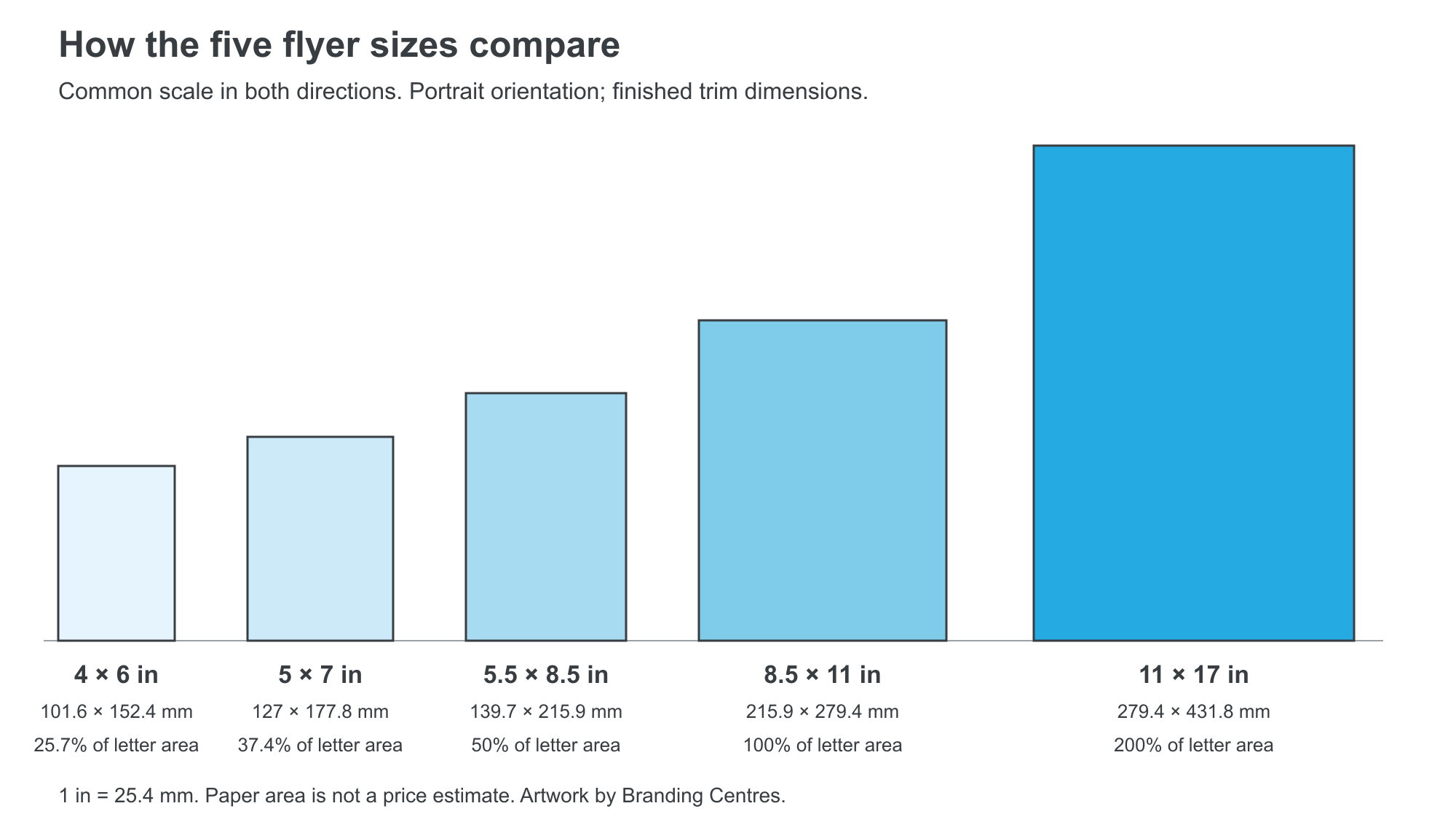
Our calculations: 1 in = 25.4 mm; area = width × height. Letter is the reference: 8.5 × 11 = 93.5 square inches. Percentages compare paper area only, not printing prices or readable copy capacity.
If you searched “standard flyer sizes Canada,” start with finished dimensions. Our flyer products and finishes help you compare the printed piece.
The flyer printing service lists half sheet, letter, tabloid and custom dimensions. Confirm 4 × 6 in and 5 × 7 in availability, stock and timing before preparing those custom orders.
Choose the size for the handout, counter or display
Choose a smaller flyer for a short message that travels with the reader, and a larger one when the content needs more breathing room.
Start with the distribution point: a takeaway bag, consultation desk and shop window each call for a different layout.
4 × 6 in: one offer and one next step
A 4 × 6 in flyer suits a coupon, bag insert or brief invitation. Keep contact details visible; if the expiry date and conditions only fit after shrinking everything, move up a size.
5 × 7 in: an image with supporting details
A 5 × 7 in flyer gives a photograph more room than 4 × 6 in. Use it for a restaurant feature or open-house invitation with a short description and next step.
Half sheet: a practical handout
A 5.5 × 8.5 in flyer suits event handouts, restaurant specials and service promotions. Print a sample and check the offer, date, location and next step at a comfortable reading distance.
Letter: more information without squeezing the layout
An 8.5 × 11 in sheet suits a property overview, service comparison or menu with several sections. Give the headline, image, details and contact information separate space; avoid filling every gap.
Tabloid: detail or a larger viewing area
An 11 × 17 in sheet suits detailed schedules or grouped sale offers.
For display, test the headline from the intended viewing distance. For folding, confirm the finished folded size and panel layout before designing; a fold changes the reading order.
How size affects stock, quantity and cost
Paper, quantity, sides, finishing and turnaround affect the total alongside size.
Half sheet has half the area of letter, but the job will not necessarily cost half as much. File checking, setup, sheet layout and cutting still matter.
Compare quotes with identical quantity, stock, finish and printed sides, changing only the dimensions. Keep the scope consistent in CAD and identify HST and delivery separately.
Print cost per piece = total print-only quote ÷ quantity. Compare pre-HST printing totals that include the same setup and finishing; exclude delivery from both. A larger quantity may spread setup costs across more pieces, but savings depend on the job.
Compare one-sided and double-sided layouts before adding paper area. A second side can hold supporting details, but the front must still explain the offer and give readers a reason to turn it over.
GSM means grams per square metre: paper weight per area, not a direct measure of stiffness. Ask for samples to compare feel and handling; confirm the available stock rather than assuming a weight is stocked.
Compare matte and gloss samples in the intended lighting, or ask about uncoated stock when people need to write on the flyer. Confirm stock, coating and turnaround together.
Quantity should follow distribution. Count the locations, event sessions or customer orders to cover, then add your planned reserve.
Branding Centres has no minimum order for flyers. For urgent work, confirm size and stock before finalizing artwork.
Prepare the file at the finished size
Build your document at its final trim dimensions, then add the required bleed and keep essential content inside the safe area.
The current Branding Centres flyer specifications call for a print-ready PDF, CMYK colour, 0.125 in bleed on each side and a 0.125 in safety zone inside the trim. That inch measurement equals exactly 3.175 mm; it is often rounded to “3 mm,” but use the template's actual setting rather than mixing the two.
Start with downloadable print templates and the print design guide. Confirm the template matches your size and finishing.
Worked example: 500 half-sheet restaurant flyers
For 500 double-sided takeaway-menu flyers finishing at 5.5 × 8.5 in [139.7 × 215.9 mm], set the trim to those dimensions and add 0.125 in bleed on every side.
The artwork boundary including bleed becomes 5.75 × 8.75 in [146.05 × 222.25 mm]: add 0.25 in to each dimension because there are two edges. Crop marks, if requested, may make the overall exported PDF larger still.
Extend edge-to-edge backgrounds into the bleed. Keep the name, prices and terms inside the safe area, then check both sides for matching orientation.
For photographs, check resolution at the size they will appear in print. The shop requests 300 DPI; image-editing software describes image resolution in pixels per inch, or ppi, as explained in Adobe's image size and resolution guidance (2026).
A 3 × 2 in photograph needs 900 × 600 pixels to provide 300 ppi at that size. This calculation does not guarantee quality: focus, compression and the original photograph also matter.
Before uploading, check:
- The PDF trim dimensions match the size you are ordering.
- Backgrounds reach the bleed boundary, while essential text stays inside the safe area.
- Photographs have enough pixels at their placed size.
- The phone number, URL, dates, prices and any QR code are correct and tested.
- Fonts are embedded in the PDF, and front/back orientation is correct.
- Your request names the quantity, stock or preferred feel, sides, finish and required date.
A common mistake is reducing a letter layout to half sheet, shrinking the type and contact details too. Rebuild the smaller layout instead; our print-ready file setup guide covers the wider checklist.
Frequently asked questions
What does “standard flyer sizes Canada” mean?
Common comparison sizes include 4 × 6, 5 × 7, 5.5 × 8.5, 8.5 × 11 and 11 × 17 in. These are options, not one universal Canadian requirement. Choose by readable content and distribution, then confirm the dimensions and stock with your printer before designing a custom size.
Is 5.5 × 8.5 in big enough for a flyer?
Yes, half sheet can hold a focused offer, a useful image and clear contact details. It becomes too small when you have to squeeze several services, long terms or a full menu into the layout. Print an actual-size sample and read it comfortably before approving the design for production.
Does a smaller flyer always cost less?
No, a smaller finished size does not guarantee a lower total price. Quantity, stock, printed sides, finishing, cutting and turnaround all affect a quote. Compare two sizes using the same specifications and request the full totals, including any setup charges and HST, rather than estimating from paper area alone.
Do flyer dimensions include bleed?
No, an advertised flyer size normally describes the finished piece after trimming. Bleed extends beyond that edge and is removed. With 0.125 in bleed on each side, a 5.5 × 8.5 in flyer has a 5.75 × 8.75 in artwork boundary before any additional space for requested printer's marks.
Can I use the same design for letter and half sheet?
You can reuse the content and visual style, but each size needs a layout check. Reducing the entire letter design also reduces the text, logo and contact details. Start with the smaller version, remove unnecessary copy and adjust spacing, then export a separate PDF at each final trim size.
Can I get flyers printed the same day?
Same-day or next-day printing is available on qualifying orders, subject to file readiness, specifications and production capacity. Call with your quantity, finished size and required time before making delivery plans. A print-ready PDF helps the team assess the job; pickup in Etobicoke or Uber delivery can be discussed when timing is confirmed.
Need flyers printed quickly?
Send your artwork, finished size, quantity and deadline so we can confirm a production plan.
Test flyer sizes with your actual content on paper. If you started with “standard flyer sizes Canada,” use readability and distribution to narrow the options.
Branding Centres offers same-day or next-day production on qualifying orders, with no minimum, pickup in Etobicoke or Uber delivery. Timing depends on the file, specifications and production capacity; confirm your required time before relying on a rush schedule.
Review our flyer printing options and upload your artwork for an exact flyer quote, or call +1 (416) 288-8661. Pickup: 24 Ronson Drive, Unit 1, Etobicoke, ON M9W 1B4 · Info@BrandingCentres.com.